

Tide Lock: Exploiting an Unsafe Android intent: URI Flow
Introduction
Tide Lock is an Android password-manager application used in a Mobile Hacking Lab exercise. The application stores website credentials and provides functionality for creating, editing, and viewing password entries.
The core security issue is an unsafe handling of untrusted URLs. A URL stored in a password entry is later parsed with Intent.parseUri() and passed to startActivity(). Because the application does not adequately constrain the resulting Intent at that point, an attacker-controlled URL can be used to reach an internal application component.
The application’s manifest declares several activities as non-exported, including FlagActivity. However, the Android component restriction does not prevent the application itself from launching its own non-exported activities. Consequently, if attacker-controlled data reaches an internal startActivity() call, it can potentially be used to invoke components that are not directly accessible to another application.
The lab demonstrates this issue by reaching FlagActivity and retrieving the challenge flag.
Application Architecture
The application requests Internet access:
<uses-permission android:name="android.permission.INTERNET"/>
Its manifest contains several activities. MainActivity is exported and serves as the launcher activity, while the password-management activities are marked as non-exported.
<activity
    android:name="com.mobilehackinglab.yay.tidelock.MainActivity"
    android:exported="true">
    <intent-filter>
        <action android:name="android.intent.action.MAIN"/>
        <category android:name="android.intent.category.LAUNCHER"/>
    </intent-filter>
</activity>

<activity
    android:name="com.mobilehackinglab.yay.tidelock.LockerActivity"
    android:exported="false"/>

<activity
    android:name="com.mobilehackinglab.yay.tidelock.CreateMasterPasswordActivity"
    android:exported="false"/>

<activity
    android:name="com.mobilehackinglab.yay.tidelock.FlagActivity"
    android:exported="false"/>

<activity
    android:name="com.mobilehackinglab.yay.tidelock.EditPasswordActivity"
    android:exported="false"/>
The relevant component configuration is important because FlagActivity is not exported. An external application therefore cannot simply launch it through the normal Android component-resolution mechanism. The vulnerable code, however, executes inside Tide Lock itself, which changes the security boundary.
Application Startup Flow
When Tide Lock starts, MainActivity checks whether a master password has already been configured.
If no master password exists, the application launches CreateMasterPasswordActivity. Otherwise, it proceeds to LockerActivity.
public final class MainActivity {
    protected void onCreate(Bundle yaybundleyay) {
        if (!authManager.isMasterPasswordSet()) {
            startActivity(new Intent(mainActivity, CreateMasterPasswordActivity.class));
            finish();
            return;
        }

        if (authManager2.isMasterPasswordSet() && !booleanExtra) {
            startActivity(new Intent(mainActivity, LockerActivity.class));
            finish();
            return;
        }
    }
}
This establishes the normal application flow:
- Launch Tide Lock.
- Create a master password if one has not been configured.
- Authenticate with the master password.
- Enter the password locker.
- Create or edit password entries.
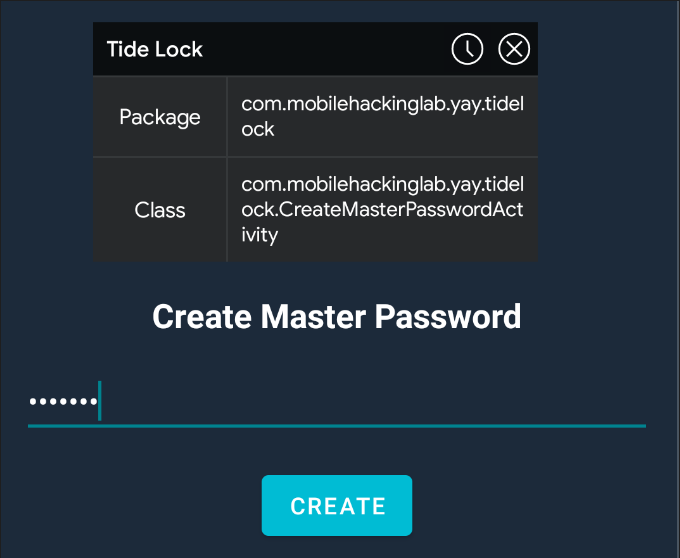
Figure 1 shows the Create Master Password interface and identifies CreateMasterPasswordActivity as the active application component.
Password Entries
After authentication, the application allows users to create password entries containing information such as:
- Website or service name
- URL
- Username
- Password
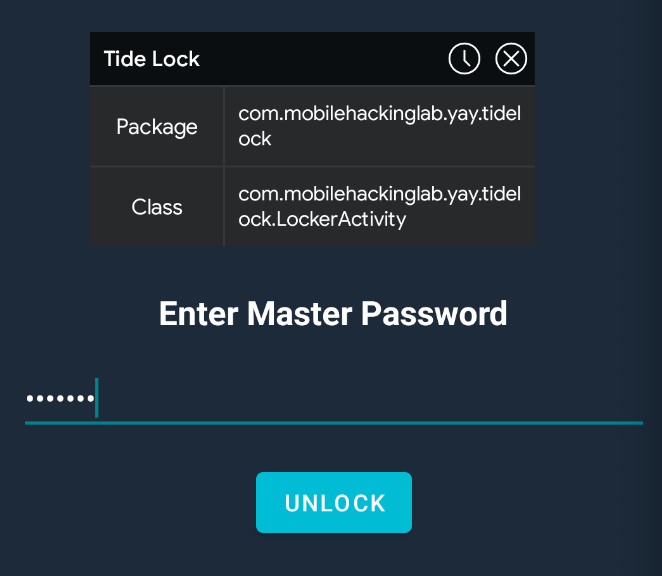
Figure 2 shows the master-password unlock interface. Once authentication succeeds, the user can access the stored password entries and add new credentials.
A typical entry contains a website name, URL, username, and password. Tide Lock also provides functionality for backing up and restoring stored entries.
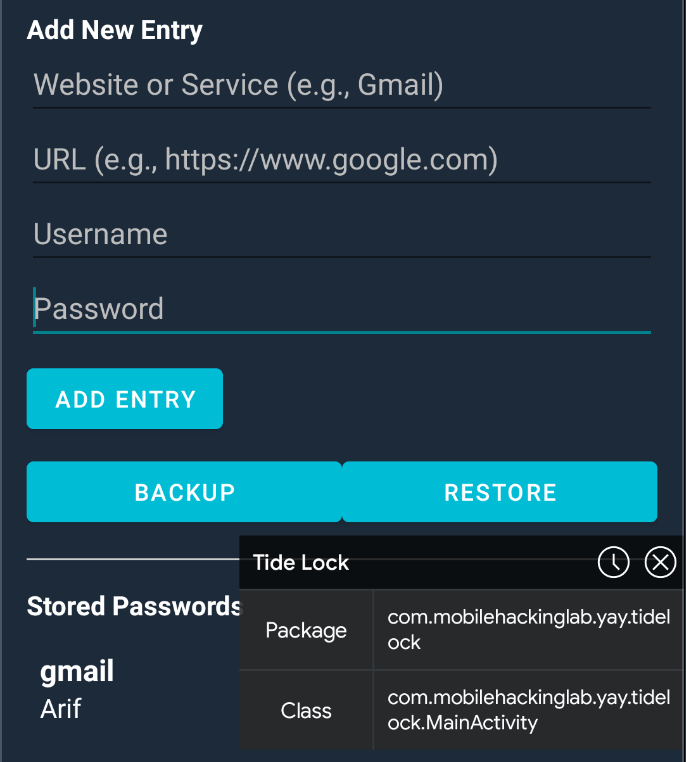
Figure 3 shows the Add New Entry interface. It includes fields for the website/service, URL, username, and password, along with ADD ENTRY, BACKUP, and RESTORE controls.
After an entry is created, the application displays its details and provides controls for copying credentials, fetching the website favicon, and editing the entry.
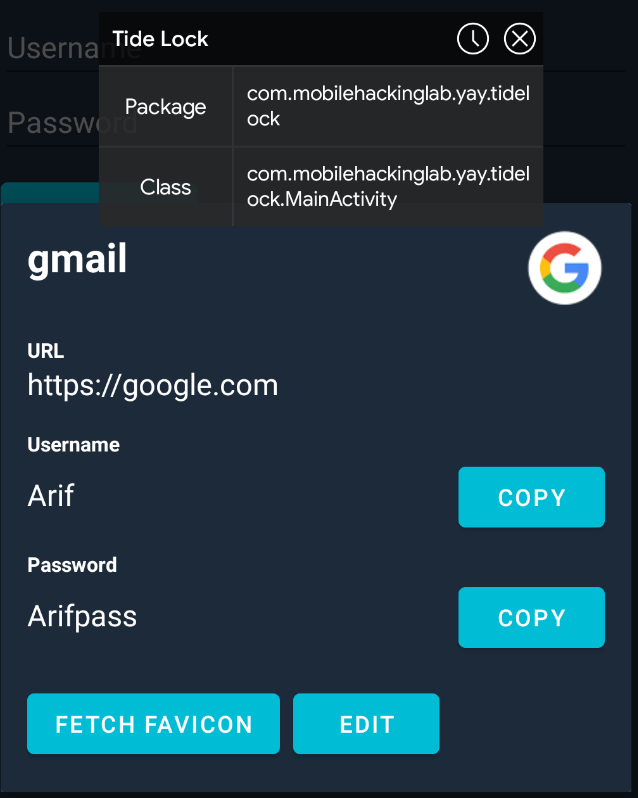
The password-details view shown on Figure 4 exposes the functionality that becomes important later in the attack. The FETCH FAVICON button causes Tide Lock to process the URL associated with the password entry.
Identifying the Vulnerable Code Path
The vulnerable flow originates in PasswordDetailDialogFragment.
The fragment registers an OnClickListener for the fetchFaviconButton:
public final class PasswordDetailDialogFragment extends DialogFragment {

    @Override
    public void onViewCreated(View view, Bundle savedInstanceState) {
        Button button = view.findViewById(R.id.fetchFaviconButton);

        button.setOnClickListener(v ->
            PasswordDetailDialogFragment.onViewCreated$lambda$7(
                this, view, v
            )
        );
    }
}
The important observation is that clicking Fetch Favicon does more than retrieve an image. It retrieves the URL stored in the password entry and subsequently checks its scheme.
The intent: URI Handling
The relevant handler retrieves the URL from the current PasswordEntry:
String url = passwordEntry.getUrl();
It then checks whether the URL begins with the string intent:. The string is not written directly in the Java code; instead, it is reconstructed through a native method:
if (StringsKt.startsWith$default(
        url,
        NativeUtils.INSTANCE.decodeScheme(new byte[]{67, 68, 94, 79, 68, 94, 16}),
        false, 2, null)) {
    Intent uri = Intent.parseUri(url, 1);
    NativeUtils nativeUtils = NativeUtils.INSTANCE;
    nativeUtils.sanitizeIntent(uri);
    uri.addFlags(268435456);
    yayviewyay.getContext().startActivity(uri);
    return;
}
The critical sequence is:
- Retrieve the stored URL.
- Determine whether it begins with
intent:. - Parse the string with
Intent.parseUri(). - Pass the resulting Intent through
sanitizeIntent(). - Add
FLAG_ACTIVITY_NEW_TASK. - Launch it with
startActivity().
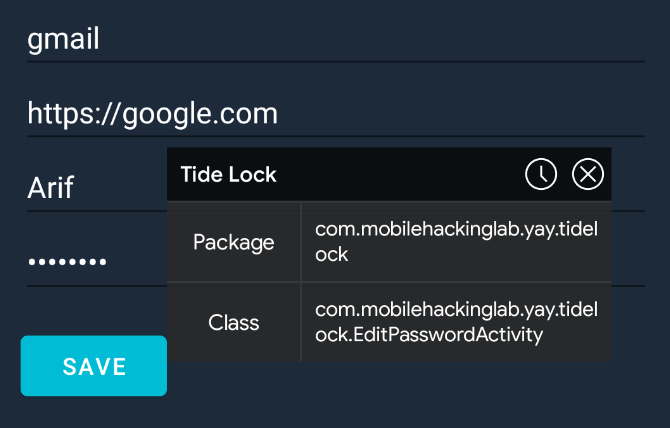
Figure 5 shows the edit-password interface alongside the vulnerable PasswordDetailDialogFragment flow. By this when the URL uses the intent scheme, it is parsed as a URI and ultimately supplied to startActivity().
Native URL-Scheme Obfuscation
Tide Lock uses a native JNI function named NativeUtils_decodeScheme() to decode the string used for the scheme check.
The encoded byte array is:
67 68 94 79 68 94 16
The native implementation reverses the encoding by XORing every byte with 0x2A:
JNIEXPORT jstring JNICALL Java_com_mobilehackinglab_yay_tidelock_NativeUtils_decodeScheme(
    JNIEnv *env, jobject thiz, jbyteArray encoded) {
    jsize len = (*env)->GetArrayLength(env, encoded);
    jbyte *bytes = (*env)->GetByteArrayElements(env, encoded, NULL);
    char *decoded = (char *)malloc(len + 1);

    for (int i = 0; i < len; i++)
        decoded[i] = bytes[i] ^ 0x2A;

    decoded[len] = '\0';
    (*env)->ReleaseByteArrayElements(env, encoded, bytes, JNI_ABORT);

    jstring result = (*env)->NewStringUTF(env, decoded);
    return result;
}
XORing the encoded bytes with 0x2A produces:
intent:
This is only obfuscation, rather than a security boundary. Anyone inspecting the native implementation can recover the string used by the Java-side scheme check.
Understanding sanitizeIntent()
At first glance, the presence of sanitizeIntent() might suggest that the application is safely handling the parsed Intent. The native implementation does perform several sanitization operations.
It first restricts the Intent to the Tide Lock package:
intent.setPackage(
    "com.mobilehackinglab.yay.tidelock"
);
It also clears the Intent’s data:
intent.setData(null);
The implementation then accesses the Intent’s extras and removes the existing key-value pairs.
Finally, it adds a validation marker:
intent.putExtra(
    "FLAG_REQUEST_VALID",
    true
);
The relevant native logic can be summarized as follows:
// Restrict the Intent to Tide Lock.
intent.setPackage("com.mobilehackinglab.yay.tidelock");

// Remove the Intent's data URI.
intent.setData(null);

// Enumerate and remove existing extras.
for each key in intent.mExtras:
    intent.removeExtra(key);

// Mark the request as valid.
intent.putExtra("FLAG_REQUEST_VALID", true);
The NativeUtils_sanitizeIntent() function performs the following sanitization operations: package restriction, removal of the data URI, removal of extras, and insertion of the FLAG_REQUEST_VALID value.
Why the Sanitization Does Not Prevent the Lab Attack
The important detail is that sanitization does not make the Intent external or privileged. Instead, it restricts the target package to Tide Lock itself.
That means an Intent containing an explicit component such as:
com.mobilehackinglab.yay.tidelock/.FlagActivity
can remain capable of targeting a component inside the Tide Lock package.
The distinction is important:
| Property | Effect |
|---|---|
android:exported="false" |
Prevents other applications from directly launching the component |
Intent.setPackage(...) |
Restricts resolution to the specified package |
| Explicit component | Identifies a particular activity within that package |
Internal startActivity() |
Allows the Tide Lock process to launch its own components |
Therefore, the security boundary being crossed is not necessarily “external application directly launching FlagActivity.” Instead, attacker-controlled data is being converted into an Intent and then acted upon inside the vulnerable application.
The Intended Target: FlagActivity
The lab uses FlagActivity as the target component.
The following Intent URI is used:
intent:#Intent;component=com.mobilehackinglab.yay.tidelock/.FlagActivity;end
This is an explicit Android Intent URI. Its important fields are:
| Field | Value |
|---|---|
| Scheme | intent: |
| Target package | com.mobilehackinglab.yay.tidelock |
| Target activity | .FlagActivity |
When Tide Lock processes the URL through the vulnerable favicon flow, the URI is parsed into an Android Intent, sanitized, and passed to startActivity().
Why the Initial Injection Attempt Fails
There is an important defensive check in the application when creating a new password entry.
The application validates the URL against a hard-coded list of accepted schemes:
private final boolean isValidUrl(String url) {
    List<String> list = Arrays.asList(
        "http://", "https://", "ftp://", "smb://",
        "rdp://", "ssh://", "scp://"
    );

    for (String scheme : list) {
        if (url.startsWith(scheme)) return true;
    }

    return false;
}
If the URL does not match one of these prefixes, Tide Lock displays an error dialog.
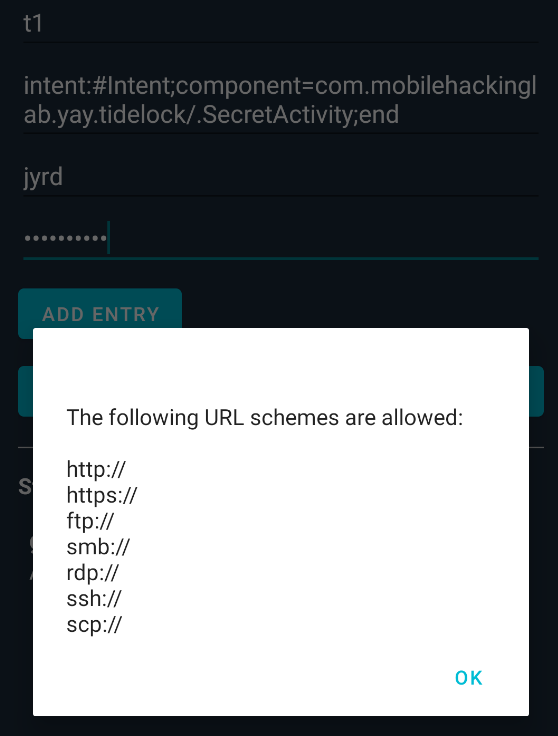
Figure 6 demonstrates the application’s response when an intent: URI is entered as a new password entry. The dialog lists the allowed schemes:
http://https://ftp://smb://rdp://ssh://scp://
Notably, intent: is absent from the list.
The validation is straightforward:
if (!isValidUrl(string2)) {
    new AlertDialog.Builder(this)
        .setTitle("Invalid URL Scheme")
        .setMessage("The following URL schemes are allowed:\n\n" + allowedSchemes)
        .setPositiveButton("OK", null)
        .show();
    return;
}
The new-entry path therefore blocks a direct attempt to save an intent: URI.
The Validation Bypass: Editing an Existing Entry
The more significant issue appears in EditPasswordActivity.
The new-entry workflow validates the URL before storing it. The edit workflow, however, constructs a new PasswordEntry directly from the values in the edit fields.
The relevant code is:
public static final void onCreate$lambda$0(
    EditPasswordActivity this$0, PasswordEntry passwordEntry, View view
) {
    EditText editText2 = this$0.urlEditText;
    String string2 = editText2.getText().toString();

    PasswordEntry passwordEntry2 = new PasswordEntry(
        string, string2, string3, editText4.getText().toString(),
        passwordEntry != null ? passwordEntry.getFavicon() : null
    );
}
There is no corresponding call to isValidUrl() in the shown update path.
The result is an inconsistent validation model:
| Operation | URL validation |
|---|---|
| Create a new entry | Allowed schemes are checked |
| Edit an existing entry | URL is accepted without the same validation |
| Fetch favicon | Stored URL can reach the intent: parsing branch |
This difference is the key to reaching the vulnerable code path.
The Security Lesson
Input validation must be applied consistently at every point where attacker-controlled data enters or changes security-sensitive state.
Validating only during creation is insufficient when the same field can later be modified through another workflow.
In this case:
New entry
    |
    +--> URL whitelist
            |
            +--> intent: rejected

Existing entry
    |
    +--> Edit URL
            |
            +--> No equivalent validation
                    |
                    +--> intent: stored
                            |
                            +--> Fetch Favicon
                                    |
                                    +--> Intent.parseUri()
                                            |
                                            +--> startActivity()
Triggering the Vulnerable Flow
Once the URL field of an existing entry contains the crafted Intent URI, the FETCH FAVICON button becomes the trigger.
The relevant payload used in the lab is:
intent:#Intent;component=com.mobilehackinglab.yay.tidelock/.FlagActivity;end
The important point is that the payload is not supplied directly to startActivity(). It first travels through the application’s URL-processing logic:
Stored URL
   |
   v
PasswordEntry.getUrl()
   |
   v
Check for "intent:"
   |
   v
Intent.parseUri(url, 1)
   |
   v
NativeUtils.sanitizeIntent(uri)
   |
   v
Add FLAG_ACTIVITY_NEW_TASK
   |
   v
Context.startActivity(uri)
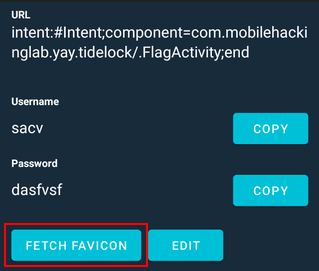
Figure 7 shows an edited password entry whose URL contains the explicit FlagActivity Intent URI. The screenshot also highlights the FETCH FAVICON button that triggers the vulnerable processing path.
When FETCH FAVICON is clicked, the URL is processed by the code described above. The explicit component points the resulting Intent at the application’s internal FlagActivity.
Lab Result
The lab ultimately reaches FlagActivity, which displays the challenge flag.
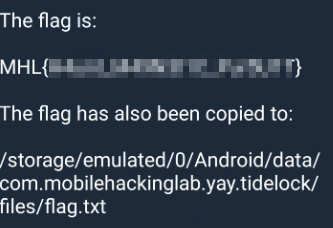
Figure 8 shows FlagActivity displaying the flag and indicates that it is also copied to the application’s private storage area. Note that, in the emulator, only a fake flag is displayed, whereas in the MHL lab environment, the correct flag is obtained.
/storage/emulated/0/Android/data/com.mobilehackinglab.yay.tidelock/files/flag.txt
Root Cause
The vulnerability is best understood as a combination of several implementation decisions rather than a single API call.
1. A security-sensitive field is treated as a URL
The password entry stores a URL supplied through the application UI. That value is later reused by another feature.
2. Validation is inconsistent
The new-entry workflow restricts URLs to a fixed set of schemes, but the demonstrated edit workflow does not perform the same validation.
3. intent: URLs are deliberately recognized
The favicon functionality contains a special branch for URLs beginning with intent:.
4. The URL is converted into an Android Intent
Intent.parseUri() turns the stored string into an executable Intent representation.
5. The resulting Intent is launched
The application eventually passes the parsed Intent to startActivity().
6. Package restriction is not equivalent to component authorization
Although sanitizeIntent() restricts the Intent to Tide Lock’s package, it still allows an explicit target within that package, as demonstrated by the Intent targeting FlagActivity.
Taken together, these behaviors allow a value that is rejected by one input path to be introduced through another and subsequently interpreted as an Android Intent.
Recommended Remediation
A secure implementation should avoid treating user-controlled URL strings as executable Intent descriptions.
Apply URL validation consistently
The same validation policy should be used when:
- Creating an entry
- Editing an entry
- Importing entries
- Restoring backups
- Processing stored URLs
Validation should not depend on which UI path was used to supply the value.
Do not parse arbitrary intent: URIs
The safest approach for a favicon feature is to accept ordinary web URLs and construct the required network request explicitly.
For example:
Uri uri = Uri.parse(url);

if (!"https".equalsIgnoreCase(uri.getScheme())
        && !"http".equalsIgnoreCase(uri.getScheme())) {
    throw new IllegalArgumentException("Unsupported URL scheme");
}
The application can then use the URL strictly as a network resource rather than interpreting it as an Android Intent.
Prefer an explicit allowlist
If the feature genuinely requires multiple protocols, validate the parsed URI scheme against a narrowly defined allowlist.
For example:
Set<String> allowedSchemes = Set.of(
    "http",
    "https"
);

Uri uri = Uri.parse(url);
String scheme = uri.getScheme();

if (scheme == null ||
    !allowedSchemes.contains(scheme.toLowerCase(Locale.ROOT))) {
    throw new SecurityException("Unsupported URL scheme");
}
The exact allowlist should match the application’s functional requirements.
Avoid relying on obfuscation
The native XOR transformation does not provide meaningful security. A hard-coded string can be recovered from the application binary.
Security decisions should be enforced through actual authorization and validation logic rather than obscuring sensitive strings.
Treat Intent construction as a privileged operation
If an application must launch an activity based on user-controlled input, it should not allow the input to specify arbitrary:
- Package names
- Component names
- Actions
- Categories
- Flags
- Extras
- Data URIs
Instead, the application should construct the Intent itself from trusted, explicitly validated values.
Key Takeaways
The Tide Lock lab demonstrates a common Android security mistake: confusing data validation with safe Intent handling.
The important observations are:
MainActivitycontrols the application’s initial navigation.FlagActivityis declared withandroid:exported="false".- New password entries enforce a URL-scheme allowlist.
- The edit workflow does not apply the same URL validation shown in the new-entry workflow.
- The favicon feature recognizes the
intent:scheme. Intent.parseUri()converts the stored URL into an AndroidIntent.sanitizeIntent()restricts the package and removes data/extras, but the explicit internal component remains relevant.startActivity()is eventually called with the resulting Intent.- The crafted URI targets
com.mobilehackinglab.yay.tidelock/.FlagActivity. - The lab’s
FlagActivityreveals the challenge flag.
The central lesson is that untrusted strings should remain data throughout their lifetime unless there is a strong, explicitly controlled reason to interpret them as executable platform objects. In Android applications, particularly sensitive operations such as Intent creation and component launching should be driven by trusted application logic rather than arbitrary user-controlled strings.